
Find out what your
ad account is wasting
Upload your Amazon search term report and see how much of your spend is going to search terms that have never made a sale, with the list of terms to negate. Free, instant, and we never touch your account.
Run the audit
- Upload your report
- See your results
- Get the full report
Drop your search term report here
The Sponsored Products search term report, as an .xlsx or .csv file.
Choose a fileRead in your browser. Don't have it yet? Here's how to download it, or .
What your report
looks like
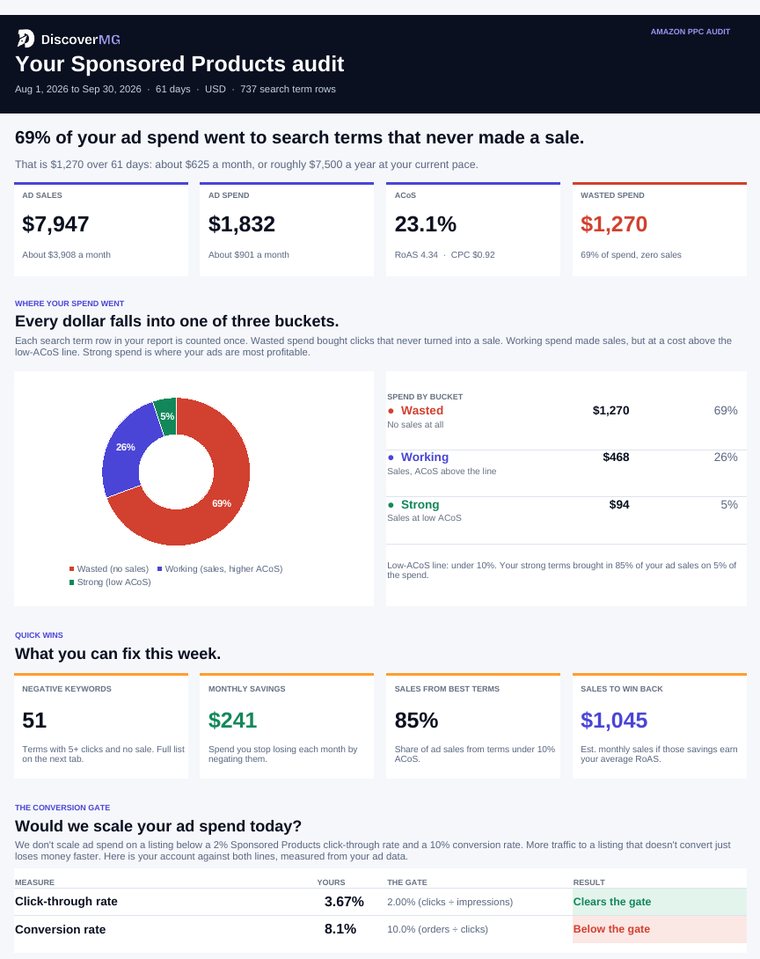
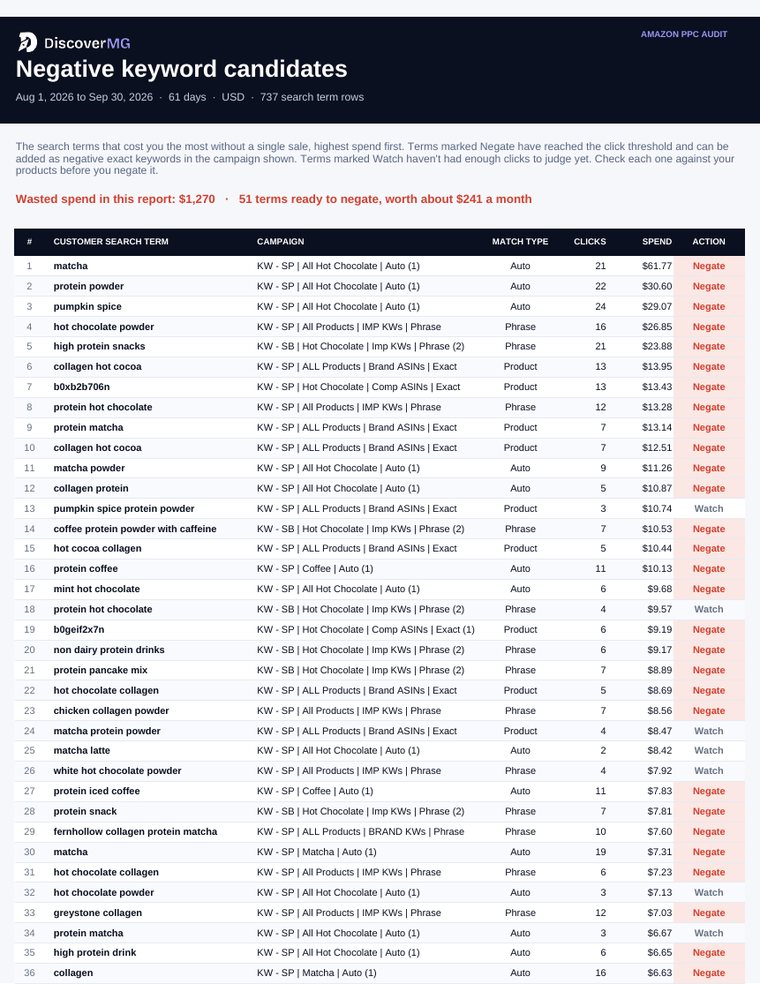
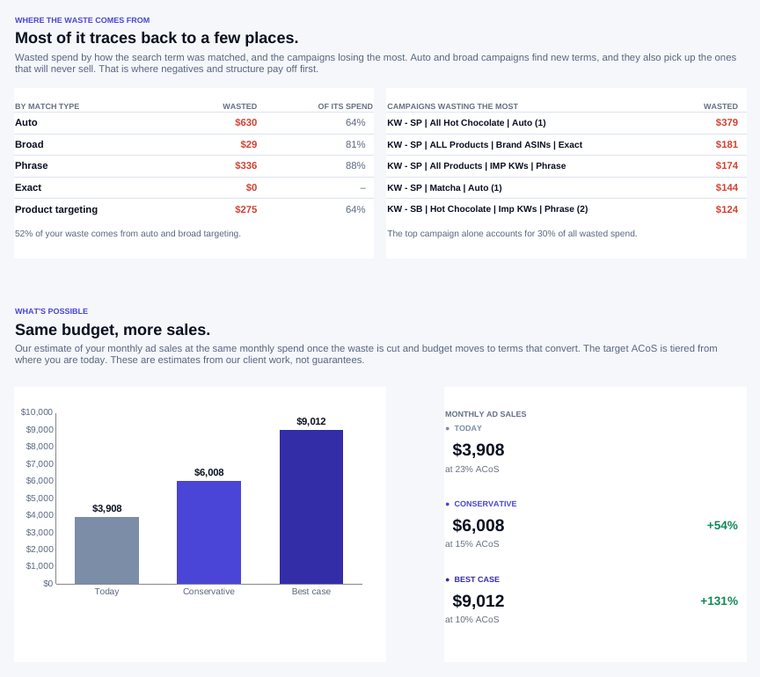
This sample was built from a real account's search term report, with the brand, competitors and products swapped for fictional ones and the numbers adjusted.
- Your audit summary: wasted spend, where it goes, and what to fix this week
- Negative keyword list: the costliest terms with no sales, ready to negate
- Best search terms: which ones to promote to exact match
- Conversion Gate check and what the same budget could earn
Excel file, opens in Excel or Google Sheets. Sample brand and figures are fictional.
How to download your
search term report
It takes about five minutes, most of it waiting for Amazon to build the file. You need access to the advertising console for your brand.
Open the Amazon Ads console
In Seller Central, open the menu and choose Advertising, then Campaign Manager. You can also go straight to advertising.amazon.com and sign in.
Go to Sponsored ads reports
In the left-hand menu, open Measurement & Reporting and choose Sponsored ads reports. Then click Create report.
Choose these settings
Set the report category to Sponsored Products and the report type to Search term. Pick Summary as the time unit and a report period of the last 30 days. Leave the rest as it is.
Run the report
Click Run report. Amazon builds it in the background, which usually takes a few minutes. It appears in your report list with its status.
Download it and upload it here
When the status shows the report is ready, click Download. Upload that file in the tool above, exactly as it downloaded.
Summary or Daily?
Either works. Summary puts each search term on one row for the whole period, which makes the negative keyword list cleaner. Daily is fine if that's what you already have.
How far back?
The last 30 days is a good default. Up to 60 days gives slow-selling terms more time to prove themselves. Pick a period when your ads were running.
Selling in more than one country?
Each marketplace has its own report. Run one for each country you advertise in and upload them one at a time.
Most accounts are bleeding
30–40% of their budget
Not because anyone is careless. Because search term reports are thousands of rows long, and nobody reads them weekly.
Terms that never
convert, never negated
Every campaign picks up search terms you didn't choose. Some of them buy. Many never will: wrong product, wrong intent, wrong category. Left alone, they keep spending every day.
Negate the dead,
promote the living
The same report that shows the waste shows the winners. Terms converting well in a broad campaign should be promoted to exact match, where you can bid on them properly. That weekly cycle is the highest-return job in an Amazon ad account.
Common questions
Is the Amazon PPC audit really free?
Yes. No account, no card, no trial that expires. We built it because the fastest way to show a brand we can help is to show them the money already leaking out of their account. Some people run it and hire us. Most run it and fix things themselves, which is fine.
What do I need to run it?
Your Sponsored Products search term report. In the Amazon Ads console, go to Measurement & Reporting, then Sponsored ads reports, and create a Search term report for the last 30 to 60 days. The guide on this page walks through every setting.
Which file formats work?
The .xlsx file Amazon gives you, or a .csv export of the same report. Upload it as downloaded. You don't need to edit or clean it first.
Do you get access to my Amazon account?
No. You upload a report file. We never ask for Seller Central credentials and the tool doesn't connect to your account. Your numbers are calculated in your browser. When you ask for the full report, we save a copy with your email so our team can follow up.
Is a PPC audit template not enough?
A template makes you do the work by hand, and most people abandon it halfway through because search term reports run to thousands of rows. This does the same analysis in seconds. If you'd rather work it manually, the method isn't a secret: group by search term, find the ones with meaningful spend and no orders, and negate them. The full method, plus eleven other checks, is in our Amazon PPC audit checklist.
How is this different from Helium 10 or a paid audit tool?
Paid suites do far more than this, and if you already pay for one you may not need it. This does one job well: it finds the spend going to search terms that have never converted, which is the most common leak we see, and hands you the list.
What happens after I run it?
You see your numbers straight away. Add your email and you get the full branded report as an Excel file. If you want someone to fix it, book an audit call and we'll go through your listings and ad account with you.
Run it on your account. It costs nothing.
If the number is uncomfortable, we do this for a living. The same discipline took one client's TACoS from 28.3% to 16.1% and another's click-through rate from 2.85% to 11.82%.
- No account connection, no card, no signup wall
- We never ask for Seller Central credentials
- Take the negative keyword list and apply it yourself if you like
About a minute. Nothing to install.
Want someone to
fix it for you?
Twenty minutes on your listings and ad account. We'll show you where the spend is leaking and what it's worth to fix.